
Best Free YouTube to MP4 Converters for 1080p & 4K Video Downloads (2025 Guide)

Downloading YouTube videos should be straightforward, but some people still have to deal with slow websites, annoying pop-ups, low-quality downloads, or tools that stop working without notice. Whether you want to save a tutorial, a lecture, a travel vlog, a music video, or a full-length documentary, a good free YouTube to MP4 converter is necessary.

Here I will share some of the best YouTube to MP4 video converters that my team and I used in 2025, including converters based on browsers, desktop software, mobile apps, and extensions. You will also learn how to convert YouTube to MP4 safely, how to download videos in 1080p and 4K, how to save YouTube Shorts, and how to avoid slow, unreliable, or unsafe tools.

What is a YouTube to MP4 Converter?

A YouTube to MP4 converter is a web-based tool, an app, or software that will enable you to save any YouTube video in MP4 format, the most widely supported video format whether on smartphones, laptops, TVs, or video editors.

The MP4 format is known for:

Whether you need to convert your YouTube video to MP4 or download a long lecture, a reliable tool will make this process fast and hassle-free.

Explore Cutting-Edge App Solutions

Discover how TechVerdi helps you build innovative social and video-sharing apps.

Why Do People Convert YouTube to MP4?

The following are some general uses for which people commonly use YouTube to MP4 downloaders:

But with the right converter, all this is done with ease: copy the YouTube link in MP4, select the quality, and download your video.

Launch a Legal Sports Streaming Hub

TechVerdi can help you build a fully licensed sports platform that scales globally while remaining compliant.

Convert YouTube to MP4 4K or 1080p for free

Below is a detailed, deeply researched list of the best free converters available today. Each tool is included based on reliability, user feedback, recommendations by Reddit users, speed, quality of support, and long-video compatibility.

YT-DLP (Desktop) – The Most Reliable YouTube to MP4 Downloader Today

Platforms: Windows, Mac, Linux

Cost: Free

Supports: 1080p, 1440p, 4K, 8K

The reason being, YT-DLP is widely considered the GOAT for downloading YouTube videos, especially very long ones such as 1-3 hours, high-resolution streams, and age-restricted or region-locked content.

It is one of the most widely praised tools by users across different platforms because of:

  • It handles extremely long videos
  • It rarely breaks
  • It integrates with front-end GUIs
  • It supports MP4, WEBM, and MP3
  • It delivers the best download speed

Additional Reasons Why Users Prefer YT-DLP:

Most struggle at long videos; 2–3 hours are handled easily by YT-DLP.

Although this is a command-line utility, you can use a GUI like YT-DLP GUI for a simple, user-friendly interface.

If you really want a tool that works 100% of the time, this is the one.

Best for: Long videos, high-resolution streams, advanced users.
Keeprix Logo

Keeprix (Web) – Fast, Clean, Stable Online Converter

Best for: Fast online MP4 downloads

Platforms: Any browser

Cost: Free

Supports: 720p, 1080p, 4K

Keeprix is one of the cleanest and most stable online YouTube to MP4 converters right now. Many online tools break frequently or force pop-ups, but Keeprix remains one of the few that consistently works.

Users describe it as:

  • Smooth
  • Reliable
  • Good for HD
  • Less cluttered
  • Fast processing

It’s especially beginner-friendly and requires no installation.

SnapTube

SnapTube (Mobile App) – Best for Android Downloads

Best for: Phone users, offline viewing, MP4 downloads on Android

Platforms: Android APK

Cost: Free

Supports: 360p, 720p, 1080p

SnapTube is an extremely popular YouTube converter to MP4 for Android devices. It supports almost all video platforms and automatically converts to MP4 format.

Features include:

  • Downloads videos directly to your phone
  • Supports multiple quality options
  • Great for offline content
  • Smooth MP4 export

If you frequently download content on the go, SnapTube is a strong pick.

MediaHuman

MediaHuman YouTube Downloader (Desktop) – Best for Bulk Downloads

Best for: Downloading multiple videos, playlists, channels

Platforms: Windows, Mac

Cost: Free

Supports: 1080p, 1440p, 4K

MediaHuman is one of the most reliable desktop YouTube to MP4 converters, which also supports batch downloads and playlists, making it ideal for students, researchers, and content creators.

People love it because:

  • It feels premium yet free
  • It handles playlists smoothly
  • It supports 4K MP4
  • It’s very stable
  • It avoids adware

It is among the best tools you can get for your video download needs, especially if you download videos regularly.

Shutter Encoder

Shutter Encoder – Best for Professional / Creator Use

Best for: Editors, creators, professionals, and advanced users

Platforms: Windows, Mac

Cost: Free

Supports: All major formats, including MP4

More than just a converter, Shutter Encoder is a full media processing tool with support for downloading YouTube videos in MP4, format converting, editing, encoding, and much more.

Recommended for users who want:

  • A professional-grade, stable tool
  • More than just plain downloads
  • Efficient MP4 conversion for editing

If you need MP4s for video production workflows, this is ideal.

JDownloader

JDownloader – Best for Long Videos & Large Files

Best for: Extremely long downloads, livestream archives, lectures

Platforms: Windows, Mac, Linux

Cost: Free

Supports: 720p, 1080p, 4K

JDownloader is a strong download manager that provides services for converting YouTube to MP4, too. It's especially great for:

People love it because:

  • Long videos (1–4 hours)
  • Poor internet connectivity
  • Auto-resuming downloads
  • Queueing multiple files

Perfect for individuals who download multi-hour-long videos or livestream recordings.

NewPipe

NewPipe (Android) – Lightweight, Ad-Free YouTube Downloader

Best for: Offline viewing on a lightweight Android app

Platforms: Android

Cost: Free

Supports: MP4 downloads in multiple qualities

NewPipe is an open-source YouTube client, with a high emphasis on privacy. It allows for:

People love it because:

  • Background playback
  • No ads
  • MP4 downloads
  • Smooth performance

It's lightweight and very reliable, which makes it a favorite among mobile users.

ClipGrab

ClipGrab – Simple Desktop YouTube to MP4 Converter

Best for: Quick MP4 conversions on desktop

Platforms: Windows, Mac

Cost: Free

Supports: MP4, MPEG4, and more

ClipGrab is one of the easiest desktop tools to use for downloading and converting videos into MP4 format. It is popular because:

People love it because:

  • Extremely easy to use
  • Direct MP4 conversion
  • Cross-platform support
  • Fast download speeds

ClipGrab is one of the easiest desktop tools to use for downloading and converting videos into MP4 format.

Y2Mate

Y2Mate – Quick, Easy, and Works Most of the Time

Best for: Quick online conversions

Platforms: Browser

Cost: Free

Supports: 144p – 1080p

Y2Mate is a simple, and fast YouTube to MP4 converter used by millions. It’s not always perfect, but it works well as a fast fallback option. Users rely on it because:

People love it because:

  • No software needed
  • Simple interface
  • Fast conversion
  • Wide video support

It’s not always perfect, but it works well as a fast fallback option for quick, online conversions.

Downie

Downie (Mac) – Best Native macOS YouTube Downloader

Best for: Mac users requiring high-end performance

Platforms: macOS

Price: Free trial / Paid version

Supports: 1080p, 4K

Downie is the most polished option for Apple users. It offers several key features, including:

People love it because:

  • Native macOS design
  • High-end performance
  • 4K support
  • Fast MP4 conversions

It integrates nicely with macOS and supports incredibly fast MP4 conversions, making it perfect for Mac users.

Tubely Downloader

Tubely Downloader (Chrome Extension) – Best Extension for Long Videos

Best for: Browser-based conversions

Platforms: Chrome

Cost: Free

Supports: Long videos, 720p, 1080p

Tubely is recommended because most extensions fail to handle long videos, but this one does quite well. Its key features include:

People love it because:

  • Handles long videos
  • Direct browser use
  • Supports 1080p
  • Convenient and fast

Tubely is recommended because most extensions fail to handle long videos, but this one does quite well.

SurFast Video Downloader

SurFast Video Downloader – Stable Option for Very Long Videos

Best for: Long-form content (2–3 hours)

Platforms: Web

Cost: Free

Users say SurFast remains stable even for full-length documentaries, livestreams, and educational content. Its key benefits include:

People love it because:

  • Stability on long downloads
  • Handles livestreams
  • Browser-based
  • Free to use

Users say SurFast remains stable even for full-length documentaries, livestreams, and educational content.
Secure Your Platform

TechVerdi’s cybersecurity team protects streaming platforms from malware, phishing, and data breaches.

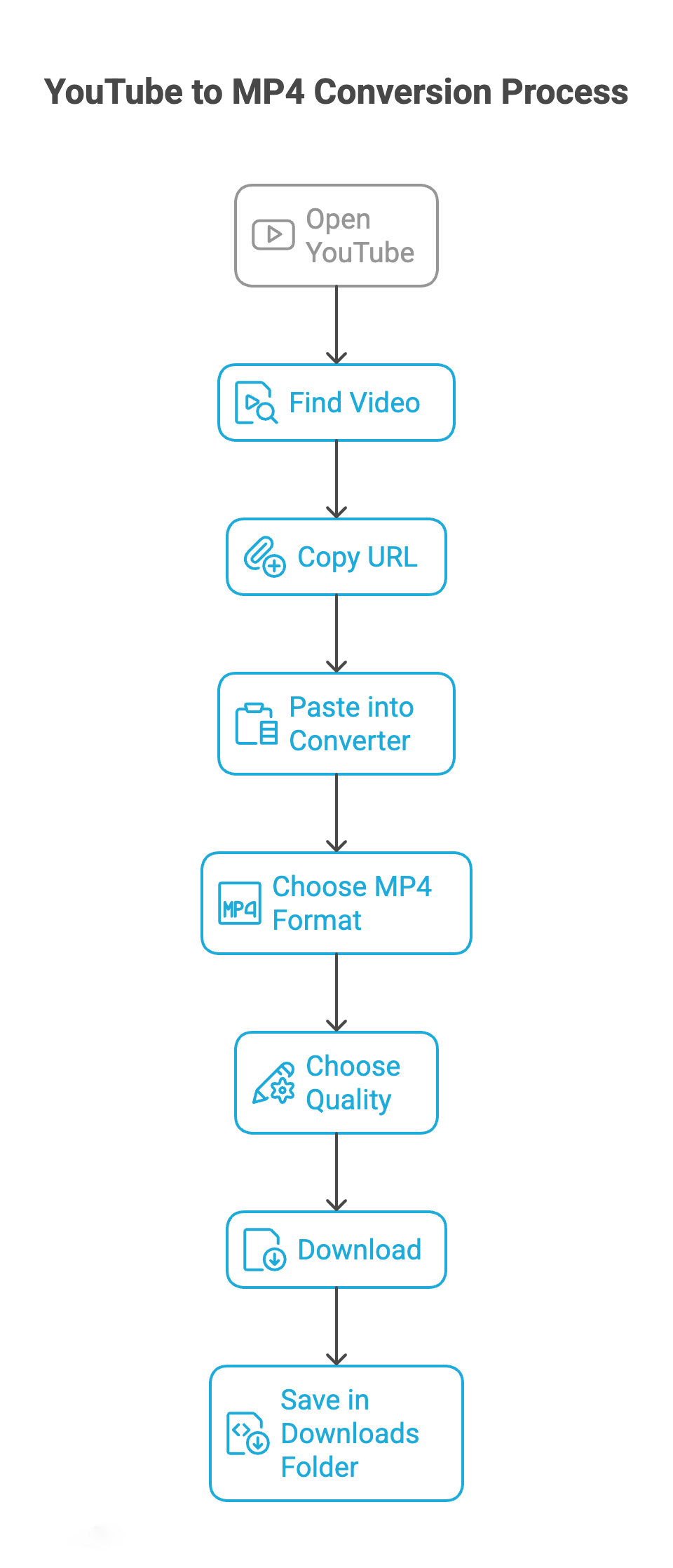
How to Convert YouTube to MP4 (step-by-step process)

This process works for any reliable converter:

Step 1 — Copy the YouTube Link

Open YouTube → find the video → copy the URL.

Step 2 — Paste into a Converter

Use whichever tool you prefer.

Step 3 — Choose MP4 Format

Most tools default to MP4 automatically.

Step 4 — Choose Quality (720p, 1080p, or 4K)

For quality:

  • 720p = good
  • 1080p = best balance
  • 4K = very clear, larger file

Step 5 — Download

Your video will be saved in the Downloads folder of your device.

How to Convert YouTube to MP4 (step-by-step process)

Build a Secure Mobile Streaming App

TechVerdi develops native Android & iOS apps for streaming platforms, optimized for security, speed, and user engagement.

What about downloading YouTube Shorts to MP4?

Most converters now support converting YouTube Shorts to MP4.

Tools that handle Shorts well include:

With smaller file sizes, shorts download almost instantaneously.

YouTube to MP4 1080p or 4K – Which Should You Choose?

When to Choose 1080p MP4

Best balance of quality and file size.

When to Choose 4K MP4

If your goal is quality, 4K MP4 is unbeatable.

Safety Tips When Using a YouTube to MP4 Converter

Downloading YouTube videos can be safe if you follow best practices:

Use well-known tools

YT-DLP, MediaHuman, ClipGrab, and NewPipe are extremely safe.

These often lead to malware or unwanted redirects.

Always good protection.

Stick to trusted sources.

Avoid downloading any copyrighted content without permission.

Legal Disclaimer

Downloading copyrighted content from YouTube without permission is against YouTube’s terms of service and may also violate local copyright laws. Only download videos you have rights to, or content that is:

This guide is for educational purposes only.

Adaptive Mobile Apps That Grow with You

TechVerdi can bring your idea to life, from concept to cloud. Contact us today to get started.

Best YouTube to MP4 Converter Apps (Mobile)

Tool Best For Quality Long Videos Platform
SnapTube Easy, fast MP4 downloads on Android 144p → 4K MP4 ✔ (resumes, large videos) Android
iTubeGo (Android) High-speed download of playlists & 4K content up to 4K MP4 ✔ (playlist support) Android
NewPipe Lightweight, ad-free, privacy-focused 720p – 1080p MP4 ✔ (small app, efficient) Android
TubeMate Classic downloader with built-in video player HD, Full HD MP4 ✔ (pause & resume) Android
YTLitePlus (iOS) Open-source, lightweight, MP4 download Up to 4K MP4 ✖ (best for shorter videos) iOS (unofficial)

Recommendation: For Android users, SnapTube offers the best balance of speed and features across all video lengths.

Best YouTube to MP4 Converter Extensions (Browser)

Tool Best For Quality Long Videos Platform
YTPM4 One-click YouTube → MP4 from browser up to 4K MP4 ✔ (Handles full YouTube videos) Firefox
YouTube To MP4 Downloader (Firefox) Simple Downloader, minimal UI up to 720p MP4 ✖ (not optimized for very long videos) Firefox
Addoncrop YouTube Downloader In-page download buttons under the video up to 4K, supports MP4, AVI, WebM ✔ (Supports long videos) Chrome, Firefox, other browsers

Recommendation: Addoncrop is the most versatile choice, offering wide browser support and high-quality options, including long videos.

Best YouTube to MP4 Converter Desktop Apps

Tool Best For Quality Long Videos Platform
VTubeGo Powerful, high-resolution, ad-free desktop conversion 720p → 8K MP4 ✔✔✔ (supports very long videos) Windows, Mac
4K Video Downloader Batch downloads, playlist saving up to 8K / 4K / 1080p MP4 ✔✔ (playlists, channels) Windows, macOS, Linux
MediaHuman YouTube Downloader Stable, playlist and channel export up to 4K MP4 ✔✔ (batch download) Windows, macOS
Freemake Video Converter All-in-one converter + editor MP4 + many other formats ✖ (not optimized for super long YouTube videos) Windows
EagleGet Lightweight download manager MP4 / FLV for streaming sites ✔ (Multi-thread, resume) Windows

Recommendation: For the highest resolution and best stability with very long content, VTubeGo is recommended. 4K Video Downloader is ideal for batch processing playlists.

Which YouTube to MP4 Converter Is the Best in 2025?

Tool Best For Quality Long Videos Platform
YT-DLP Most reliable overall 1080p–4K ✔✔✔ Desktop
Keeprix Best online converter 1080p–4K Web
SnapTube Best Android app 720p–1080p Mobile
MediaHuman Playlists & bulk 1080p–4K ✔✔ Desktop
Shutter Encoder Creator workflows 1080p–4K Desktop
JDownloader 3–4 hour videos 1080p–4K ✔✔✔ Desktop
NewPipe Lightweight mobile 720p–1080p Android

If you want one recommendation:

YT-DLP is the most reliable YouTube to MP4 converter available today.

For a simple browser-based tool:

Keeprix is the cleanest and most stable online option.

For mobile:

SnapTube or NewPipe.

Frequently Asked Questions

Which is the best free YouTube to MP4 converter?

YT-DLP currently is the most reliable and powerful converter. For online use, the best free pick is Keeprix.

Can I convert YouTube to MP4 in 1080p?

Yes, most converters support YouTube to MP4 1080p, such as Keeprix, Y2Mate, and MediaHuman.

How do I convert a link from YouTube to MP4?

The process is simple: Copy the YouTube link → paste into a converter → select MP4 → download.

Is it Legal to Convert YouTube Videos into MP4?

Only if you download content that you own, have permission to use, or that is in the public domain.

What tool is best for long videos of 2–3 hours?

YT-DLP, JDownloader, and SurFast handle long downloads the best.

Can I download YouTube Shorts to MP4?

Yes, most converters support YouTube Shorts to MP4.

Which is the best YouTube to MP4 converter available for mobile?

The best mobile applications for MP4 downloads are SnapTube and NewPipe.

How can I download age restricted videos from youtube?

Simply copy the video’s URL and paste it into your preferred converter or tool, like ytmp4.biz, turboscribe.ai, or a desktop app such as yt-dlp or JDownloader. If you’re already able to watch an age-restricted video on YouTube while signed in, then you can usually download or convert it just like any other video without any extra steps.

author-avatar

About SEO Team

Our SEO Team is a powerhouse of digital marketers, content strategists, and search engine optimization experts dedicated to keeping you informed, inspired, and ahead of the curve. From emerging trends in mobile app development and AI solutions to actionable tips on SEO, content marketing, and technical optimization, our team publishes content rooted in data, experience, and innovation. Whether you're a startup founder, digital strategist, or tech-savvy entrepreneur, you’ll find our blogs filled with value-driven insights that help your business thrive in the digital era.